

Multi-club groups
Gym software for groups of clubs.
Run two clubs or twenty from one system: memberships that work at one location, some of them or all of them, staff and reporting set per location or across the group, and head office control over what each club can change.
Memberships, your way
Each membership or agreement says where it is valid: one location, certain locations or every club in the group. The member’s record, balance and history follow them wherever it applies.
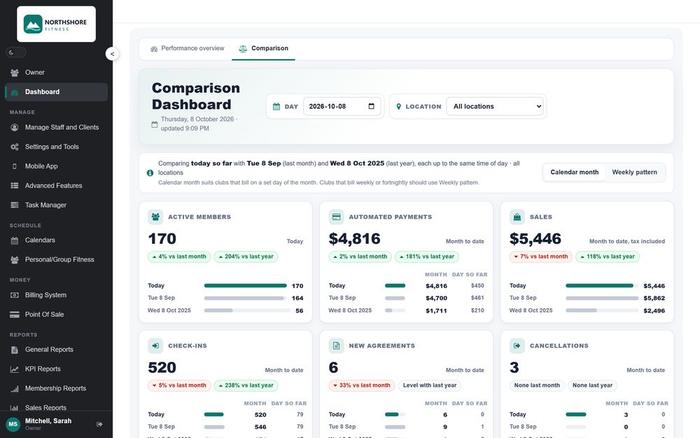
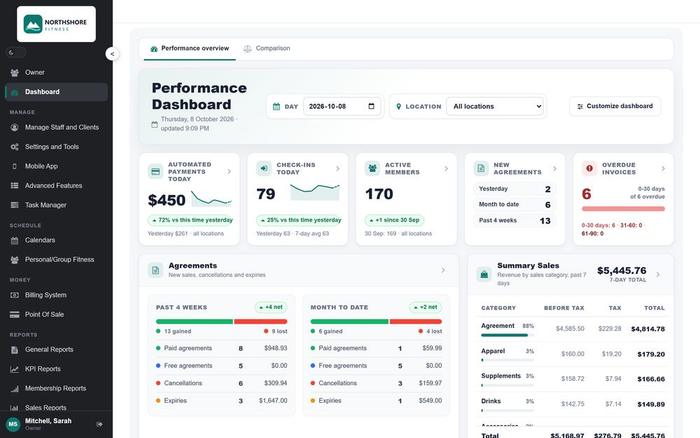
Location reporting
KPI dashboards for the group and for each club. Administrators get reporting for one location or for all of them, and compare membership growth, revenue, attendance and retention across locations.
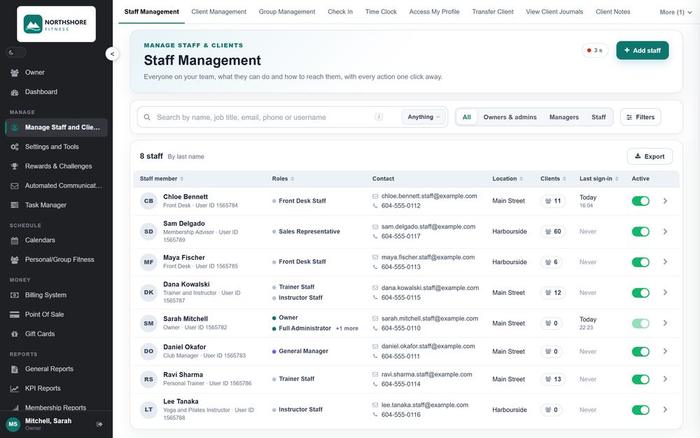
Staff and head office control
A staff account works at one location or across the group, and roles and permissions decide what each person can see and change. Head office keeps the settings and reports for the whole group.
How a group runs on InCharge
One database, every location
Set up the group
Each location is a club in the same database, with its own schedule, staff and front desk.
Members use the clubs their agreement allows
Check-in, bookings and payments work at every location the agreement covers, and post to the one member record.
Bill from one place
InCharge Pay collects dues and sales for every club, with real-time billing reports for the group and per location.
Manage from head office
Owners and managers see live dashboards for all clubs, drill down to any member, and compare locations side by side.
Questions owners ask
Multi-club groups, in plain words
Can members use every location?
That is up to you. A membership or agreement can allow access to all locations, to certain locations, or to one location only, and check-in follows what the agreement says. The member’s record, balance and history are the same wherever they go.
Can staff be limited to one location?
Yes. A staff account can work at one location or across the group, and roles and permissions decide what each person can see and change.
Can a manager see reports for just their club?
Yes. Administrators can be given reporting for one location or for all of them, and head office sees every club side by side.
Can each club have its own schedule and staff?
Yes. Each location keeps its own classes, trainers, staff accounts and front desk, inside the shared database.
Can we compare clubs?
Yes. Dashboards show the group total and each location, and you can drill down from a total to the member behind it.
Does billing run per club or for the group?
Both. InCharge Pay collects for every location in one system, and the billing reports show the group and each club.
We are adding a location. What changes?
A new club is added to the same database, so the members, prices and reports are already there. Talk to us about the set-up.

See what InCharge can do for your club
Try the live demo: a real club, the member app and the reports, at your own pace. Or book a short demo and we will walk you through it with your own club in mind.